
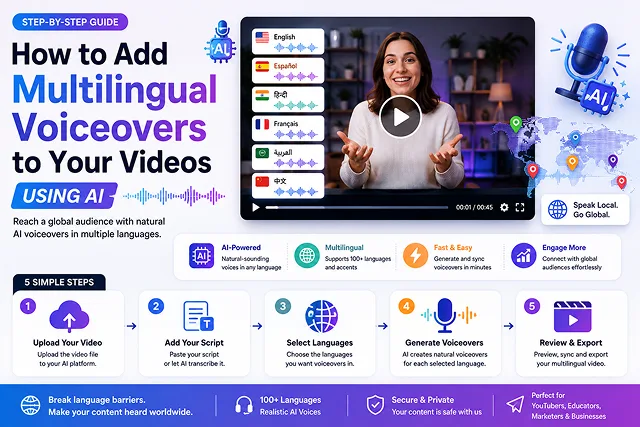
Previously, localization would have involved the need for hiring the foreign talent to perform voice-overs, securing studio time, and manually editing complex timelines. Fortunately, with the advent of AI Multilingual Dubbing you can achieve multi-lingual re-voiced - evenlip-syncing– your videos in over dozens of languages in mere minutes, without sacrificing the talent’s original emotions, pitch, and vocal identity.
From launching an international YouTube channel to localizing corporate training videos or even converting e-commerce commercials into as many as dozens of new languages-we cover all bases on how to begin adding AI multilingual voice to video.
Above-the-Fold Feature Matrix: Traditional Dubbing vs. AI Multilingual Voiceovers
Dubbing Efficiency Matrix · Human Production vs. Automated Voiceover Pipelines
| Workflow Metric | Traditional Human Dubbing | AI Multilingual Voiceover Pipeline |
|---|---|---|
| Turnaround Time | 5 to 14 Days per target language | 2 to 5 Minutes per video export |
| Cost Per Video Minute | $50.00 – $200.00+ (Voice actors + studio time) | $0.00 – $0.10 (Free on browser tools) |
| Voice Consistency | Different actors sound completely different | Preserves your exact vocal tone across languages |
| Multi-Language Scale | Extremely expensive to scale to 10+ languages | Instant scaling to 50+ languages in one click |
| Lip-Sync Accuracy | Requires tedious manual video editing | Automated AI viseme mapping matching audio cadence |
1. How AI Multilingual Dubbing Works
Traditional translation replaces an audio track with a generic text-to-speech voiceover. Modern Neural Cross-Attention Dubbing runs a synchronized pipeline:
[Initial Video and Audio] ➔ [Transcription Using Speech-to-Text Solution] ➔ [Translation by Neural Mechanism] │ [Speaker's Voice] ────➔ [Voice Imitation Process] ─────────┴─➔ [Sound Effects Production] ➔ [Developed Video Content]
- Audio Has Been Acquired and Transcribed: TArtificial Intelligence (AI)-driven speech recognition programs work on recording vocal sequences and subsequently producing transcriptions.
- Translating in Context: Neural translation machines find equivalent terms in the target language and adapt phrases according to the length of the original sentences and the video timeline.
- Cross-Language voice Cloning: Zero-shot cloning identifies intrinsic qualities of the voice (pitch, raspiness, micro-prosody) and imposes them on the new utterance spoken in a different language.
- Active Lip-SYNC & Mixing: Video models recompute lip-positions in the source language to fit translated phonemes and re-mix the background audio.
2. Step-by-Step Production Blueprint
Follow this production sequence to translate and dub videos without losing audio quality:
1. Prepare Audio Source Files
- Export video without noise. If the exported video is playing along with background music or natural sounds, use a speech filter, such as ElevenLabs’ Voice Isolator, on the audio track in the audio editing software, so that you get isolated vocals.
2. Run Automated Translation & Review Script
- Import your clean audio file into your dubbing workspace. Choose the languages you wish to translate into from English (e. G., Spanish, Hindi, Japanese). Now check the resulting transcript as some local phrases, brand names and Technical terms might need to be localized and then render.
3. Configure Voice Cloning & Emotion Multipliers
- Clone original voice. This will grab the voice identity and lay it over target language speech tokens. Tweak the motion scale/stability sliders (0.40–0.50) a little bit to ensure smooth, natural flow and no robotic pacing of the speech.
4. Execute Lip-Sync Pass & Master Audio Mix
- Turn on the Lip-syncing feature so that you voice matches the mouth movements in the target language. Overlap original background music/sound effects 18dB down below the track, in the end output in 1080P or 4KMP4.
Top AI Multilingual Dubbing Platforms
Voiceover Localization Stack · Platform Features & Target Applications
| AI Platform | Supported Languages | Primary Feature Vector | Ideal For |
|---|---|---|---|
| ElevenLabs (Dubbing V2 Studio) | 90+ Languages | Vocal Realism & Emotion Preservation. Retains natural tone, laughter, and emotion across languages. | Long-form YouTube videos, podcasts, & documentaries. |
| HeyGen (Voice & Dubbing) | 175+ Languages | Integrated Visual Lip-Syncing. Recalculates lip movements using digital avatars or real video actors. | Corporate training, marketing ads, & spokesperson videos. |
| Rask AI | 130+ Languages | Multi-Speaker Detection. Isolates and translates multiple distinct speakers within a single video file. | Podcasts, interviews, and panel discussions. |
| Descript (Overdub Localize) | 30+ Languages | Timeline Text-Based Audio Editing. Edit translations directly within a text transcript like a document. | Video podcasters, educators, and course creators. |
Request A Custom AI Video
Tell us what you're trying to create and we'll point you to the right tool — or help you set it up.
Architectural Deep Dive: Audio-to-Audio vs. Text-Based Pipelines
A comprehension of the technical distinction between the traditional approaches to text-to-speech mapping to the new and advanced Audio-to-Audio synthesis system clarifies the reason of why the current types of translations contain emotional intonations and shades of speech.
Old Pipeline: [Source Sound] -> [ASR Sound-to-Text] -> [NMT Translation] -> [Standard Text-to-Speech System] -> [Dull Sound Track]
Modern A2A Pipeline: [Source Sound] -> [Acoustic Condition Decoder] -----------------------------> [Source Text] -> [Phoneme Decoder] ---------------------------> [Cross-Attention Fusion] -> [Expressive Sound Track]
1. Legacy Text-Based pipeline (TTS)
- Mechanism: The speech is transcribed into a text string using Automatic Speech Recognition (ASR), this is then translated and input into a regular TTS engine.
- The Flaw: All the subtleties such as laughter, breath-taking pauses, dropping pitch, hesitating, intensity of emotion, etc., are lost during the text conversion process. The result is a voiceover that is reminiscent of a robot reading a text.
2. Modern Audio-to-Audio Architecture (e.g., ElevenLabs Dubbing v2)
- Mechanism: The acoustic conditioning encoder receives the continuous spatial description of the speaker's vocal characteristics from the raw audio waveform.
- The Result: The pipeline transforms the phonemes into the target language leveraging the information regarding intonation, speaker's timbre and emotional energy from the original audio file. Thus, if a speaker whispers, yells or laughs, the target language system makes exactly the same audio.
Post-Production Audio Engineering & Stem Isolation
To generate professional localized audio without drowning out background dialogue, apply this 3-Track Stem Separation Pipeline:
1. Execute Neural Demucs Stem Separation
- You need to run your master video through an audio separation tool (like Demucs v4 or DeepKaraoke) and extract the audio track into three separate midi files – vocals.wav, drums_music.wav and effects_bgm.wav.
2. Ingest Vocal Stem into AI Dubbing Engine
- Upload only the isolated Vocals.wav stem to your chosen translation model. This prevents background music, ambient hum, or sound effects from corrupting the neural cross-attention layers.
3. Apply Sidechain Ducking & Gain Staging
- Re-combine the translated AI voice track with the background audio tracks (Music and Effects) in your audio timeline. Configure an automatic Sidechain Compressor: set the background music to duck automatically by -14dB to -18dB whenever the translated voice track is active.
4. Execute Loudness Normalization Master Pass
- Perform a final LUFS normalize of the finished master audio clip; normalize the localised audio Strictly to -14 LUFS (standard of YouTube/Web or -24 LUFS (standard of Broad cast)), prior to rendering your video file.
Real-Time Streaming & Conversational WebSockets
For interactive web platforms, multi-language phone agents, or live customer support bots, pre-rendering MP4 files is too slow. Low-latency localization setups use Bidirectional WebSocket Audio Streams.
[User Mic Input] ➔ [Realtime STT Node] ➔ [LLM Processing] ➔ [Neural TTS (Flash / Turbo)] ➔ [WebSocket Audio Output]
- Latency benchmarks: Modern voice models with low latency (for instance, ElevenLabs Flash v2.5 or HeyGen StarFish) process audio input and perform translation operations resulting in producing PCM/Opus audio and streaming it back to the output within 150ms - 250ms.
- Chunked PCM streaming: Audio transmission occurs in 20 ms chunks via wss:// connections, which allows utilizing speech experience in real time during conversation before the last part of the audio is played.
AI Multilingual Voiceover Engine
Translate, voice-clone, and lip-sync video assets instantly into 50+ global languages.
Multilingual dubbing platforms run a 3-tier neural pipeline. First, an automated speech-to-text model transcribes the original spoken dialogue. Second, a Large Language Model translates the transcript while adjusting sentence length for natural timing. Finally, a cross-lingual voice synthesis model generates a new audio track in the target language while retaining the original speaker's vocal tone and cadence.
The leading enterprise-grade audio tools are ElevenLabs (Dubbing Studio) (exceptional for preserving natural human emotion and accent nuances), HeyGen and Rask AI (the best options for automated video re-dubbing with realistic lip-sync matching), and Descript (ideal for text-based video editing and localized voice replacements).
Yes. Modern cross-lingual voice architectures separate a speaker's timbre (vocal identity) from their phonetic pronunciation. By analyzing a brief 30-second audio sample, tools like ElevenLabs or Coqui can generate new speech in over 40 languages—allowing your digital voice clone to speak fluent Spanish, Japanese, or German while retaining your distinct voice pitch.
Advanced video re-dubbing engines (such as HeyGen Video Translate or Rask AI) don't just replace the audio track—they use facial keypoint synthesis to re-render the speaker's mouth movements frame-by-frame. The AI alters lip shapes to match the new language's visemes (mouth geometries), eliminating awkward "dubbed movie" mismatches.
Before exporting your dubbed audio, open the platform's Script Review or Custom Dictionary panel. Automated translators occasionally literalize brand names or technical slang. Reviewing the transcript editor allows you to lock specific brand names phonetically and manually correct regional idioms before the voice synthesis pass runs.
Enterprise dubbing systems use Speaker Diarization algorithms. The AI identifies and tags each unique voice in the source video (e.g., Speaker A vs. Speaker B), creates individual vocal clones for each person, and generates corresponding translated dialogue tracks mapped precisely to their respective timeline intervals.
Top dubbing suites utilize AI Stem Separation. The system automatically splits the original audio track into two independent layers: the vocal track and the background ambiance (music and sound effects). The AI replaces only the vocal layer with the translated speech, preserving the background music and sound effects seamlessly underneath.
YouTube allows creators to upload multiple foreign language audio files (.MP3 or .WAV) onto a single video asset via YouTube Studio. When international viewers watch your video, YouTube automatically plays the audio track matching their device language settings, dramatically boosting international retention without requiring separate channel uploads.
You must hold commercial distribution rights to the original video asset before translating and publishing localized variants. Additionally, using voice cloning to replicate third-party speakers without written authorization violates privacy laws and legal frameworks like the NO FAKES Act. Always ensure you have explicit consent from on-screen talent before generating localized voice replicas.
Follow this 3-Step Globalization Blueprint: First, upload your finished master video into a specialized tool like ElevenLabs or Rask AI and select your target languages. Second, review the generated transcript sheets to verify brand spelling, timing alignment, and lip-sync accuracy. Third, export the isolated foreign audio tracks and upload them directly into YouTube Studio's Multi-Language Audio panel to scale your global reach instantly.
Ready to try Skora AI?
Transform your ideas into cinematic video in seconds.