
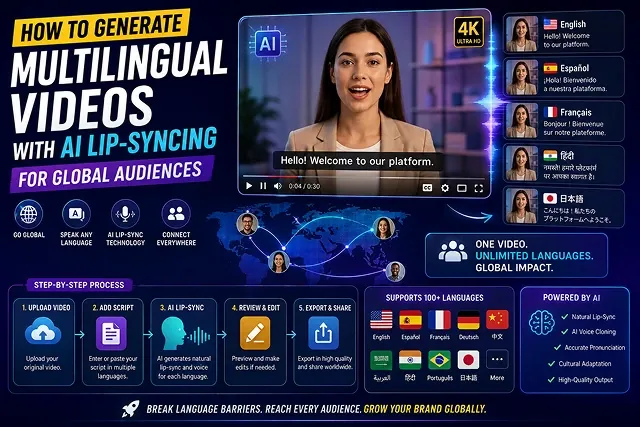
In the past, to localize video content for its target audience, it was necessary to recruit local voice artists, deal with translation companies, and spend weeks retaking the videos manually. These days, neural voice cloning and AI video dubbing enable video creators, SaaS innovators and corporate teams to automatically convert their video recordings into fifty different languages with the highest level of quality.
This article contains a detailed how-to guide on how to create a fully automated multilingual video channel compliant with modern requirements and ideas of mouth re-targeting.
Above-the-Fold Breakdown: Traditional Dubbing vs. AI Lip-Synced Localization
Localization Efficiency Matrix · Traditional Voiceover Dubbing vs. Neural Multilingual Lip-Syncing
| Localization Metric | Traditional Voiceover Dubbing | AI Multilingual Voice Cloning & Lip-Syncing |
|---|---|---|
| Turnaround Time | 2 to 4 Weeks per localized language version | 5 to 15 Minutes per language pass |
| Production Cost | $500 – $2,500+ per video/language | $0.00 – $30.00/mo SaaS or browser tools |
| Visual Lip Match | Unsynced (Mouth moves to source language) | Photorealistic Lip-Syncing mapped to target phonemes |
| Voice Consistency | Replaced by a different voice actor's timbre | Clones original speaker's tone, pitch, & cadence |
| Language Scaling | Linear cost (Hiring actors per region) | Batch rendering across 50+ languages simultaneously |
1. The 5-Step Multilingual Lip-Sync Production Pipeline
Follow this sequence to produce high-retention, localized video assets without audio-visual sync lag:
1. Source Video & Master Audio Prep
- Export out your source language video with a clear vocal isolation. Take an 80hz high-pass filter and a de-noise pass applied to the vocals. The subject’s face should be clear with static, front lighting on the face. This gives clear face tracking when running in AI.
2. Neural Speech Translation & Cultural Adaptation
- Ingest the master vocal stem into a contextual translation engine (such as DeepL or ElevenLabs Dubbing). Avoid direct word-for-word translation; adjust line lengths so the translated cadence matches the original timeline duration within 10%.
3. Zero-Shot Voice Cloning & Timbre Matching
- Render the translated audio by leveraging Zero-Shot Voice Cloning. Replicate the original voice’s intonation, emotional dynamics, and vocal fry in target language of choice (Spanish, German, Japanese, Hindi etc.). Voice stability should be set to 45%.
4. Neural Viseme & Lip-Sync Mesh Synthesis
- Pass the source video and translated audio through a Viseme Mapping Engine (such as Sync Labs API or HeyGen Translate). The model warps mouth contours and teeth geometry to match the phonemes of the target language.
5. Sidechain Audio Mixing & Multi-Language Master Export
- Drag the re-synced video onto your video editor. Layer in some room tone and background music behind the re-sync with -18 dB dynamics sidechain (ducking). Export your dubbed master 1080 Full HD (1920x1080) at 30 FPS.
2. Resolving Common AI Lip-Sync Artifacts
Automated lip-syncing can occasionally produce visual and acoustic defects. Apply these targeted corrections:
- To eliminate "Mouth Blurring & Ghosting":
- To solve the problem of audio-video desynchronization: Translated languages can require more or fewer words than English; for example, translations in German are about 20 percent longer than the original lines. Since spoken words can lag behind the images, it is essential to enable time-stretching technology on the audio track or adjust the playback speed of the video from 0.95x to 1.05 times.
- To avoid an unnatural jaw appearance: Ensure that the system being used to generate a video does not create an unnatural and stiff jaw. Choose the options that use advanced techniques capturing full lower face movements (both viseme and cheeks).
The 3 Core Tiers of AI Video Localization
Not all localization workflows require full mouth re-animation. Choose the tier that matches your production budget and audience expectations:
| Localization Tier | Technical Mechanics | Primary Tools | Best Use Cases |
|---|---|---|---|
| Tier 1: AI Audio Dubbing (No Lip-Sync) | Translates script, clones original vocal timbre, and replaces original audio stem. Mouth movements remain in source language. | ElevenLabs Dubbing, Dubverse, Rask AI | Fast news recaps, technical screencasts, and low-budget tutorials. |
| Tier 2: Neural Lip-Sync Re-Targeting | Neural network identifies facial landmarks and re-renders mouth geometry frame-by-frame to match translated speech phonemes. | HeyGen (Video Translate), Sync Labs, LipDub AI | YouTube creator content, high-converting ads, and founder updates. |
| Tier 3: Programmatic Digital Avatars | Generates full video directly from translated text scripts using a pre-trained digital twin avatar. | Synthesia (Express-2), HeyGen Avatar IV, Colossyan | Corporate training, global customer support, and product onboarding courses. |
Request A Custom AI Video
Tell us what you're trying to create and we'll point you to the right tool — or help you set it up.
3. Multi-Speaker Diarization & Audio Stem Isolation
When source footage contains multiple individuals, interviews, or dialogue, applying a single global translation model causes voice bleeding and desynchronization. You must split speakers into independent data channels before localization:
[Raw Multi-Speaker Video] ──► [PyAnnote Audio Diarization] ──┬──► [Speaker 1 Stem (.WAV) + Face Track]
                                                             └──► [Speaker 2 Stem (.WAV) + Face Track]
- Acoustic Diarization: Using systems like PyAnnote 3.1, the audio file is divided into separated time-stamped speaker Ids (S1, S2, ..., Sn) that are marked by millisecond start/stop times.
- Vocal De-Reverberation & Isolation: Each individual voice file goes through a machine-learning-based sound isolation technique, like Demucs v4 or iZotope RX Spectral De-noising, that removes unwanted background sounds, reflections, and noise.
- Facial Landmark Bounding Bins: The automatic facial recognition system creates a face map of 68 points for 3D facial recognition to determine who is speaking during every given frame in order to avoid enabling the lip sync algorithm to animate the voice of a person who is not actually speaking.
4. High-Conversion Global Script Localization Rules
Direct word-for-word translation creates pacing bottlenecks. Adapt scripts using localized cultural and semantic constraints:
- Sylicible Density Budget: Source text syllable count and the target language shall not differ by more than 5%. For languages with high syllabic expansion rate (e. G. Spanish, German,..): Guide the translation LLM: “Translate for dubbing - keep it concise, use active verbs, limit syllables to [X]”
- Idiomatic Transcreation: Replacing idioms with language-specific idioms or culture-specific references and phrases based on particular sports and slang/ slangs.
- Phonetics Term Retaining: All the brand names, technical terms, and API endpoints should not be translated as per neutrality but can use phonetic translation rules for speech processors in the language model.
5. Multi-Language Quality Audit Sequence
Follow this testing checklist before rolling out localized video assets to international distribution networks:
1. Acoustic Sibilance & Phasing Audit
- Monitor the translated vocal stems with studio headphones. Be attentive to synthetic sounds and digital harshness in high frequencies (6kHz-10kHz); use an Equalizer with a narrow filter to cut any harshness.
2. Phoneme-Viseme Impact Check
- Scrub through hard plosive sounds (such as B, P, M) in slow motion (50\% speed). Ensure the speaker's lips close on the frame where the sound hits peak volume.
3. Jaw Contour & Skin Texture Review
- Inspect the lower third of the face at 200% zoom. Verify that the synthesized mouth boundary blends with the original skin texture without blurry seams or jaw jitter.
4. Sidechain Mix & Mastering
- Balance the translated voiceover against ambient background music using sidechain ducking (-18dB attenuation). Export multi-channel audio tracks (5.1 or Stereo Master) formatted for global web players.
Multilingual AI Lip-Sync Primer
Master cross-lingual voice cloning, phonetic lip synchronization, multi-track audio routing, and global distribution.
The process uses a 4-stage neural pipeline: First, speech-to-text models transcribe and translate the original dialogue. Second, voice synthesis engines clone the original speaker's vocal timbre, pitch, and emotion into the target language. Third, viseme-mapping algorithms identify the mouth shapes needed for the translated words. Finally, a generative inpainting model re-renders the speaker's lower face and jawline to match the new audio track frame-by-frame.
The top tools for high-accuracy multilingual dubbing include HeyGen (market leader for realistic multi-lingual video translation and mouth re-targeting), ElevenLabs Dubbing Studio (best for studio-grade vocal nuance and multi-speaker separation), Rask AI (exceptional for long-form podcasts and educational courses), and Hedra AI / LipDub (specialized in expressive character head animations).
Modern neural voice cloning extracts a Voice Acoustic Fingerprint from the source recording. The neural engine analyzes resonance, breathiness, pitch cadence, and emotional stress markers, and maps those traits onto a multilingual phoneme model. This ensures that whether the speaker is translated into Spanish, Japanese, or Hindi, their unique vocal timbre remains recognizable.
Because translated phrases can be up to 30% longer or shorter than the original English script, AI dubbing tools use Dynamic Time-Warping and LLM Rephrasing. The system can either adjust speaking pace slightly while maintaining natural cadence, or instruct the translation model to adapt the wording so the syllable count matches the original scene cut duration precisely.
Top-tier AI dubbing suites apply AI Audio Stem Separation. The platform automatically splits your video's audio into clean dialogue, background ambient noise, and music tracks. It translates and swaps only the voice track, then remixes it seamlessly back over the original music bed and sound effects with automatic audio ducking.
Instead of splitting your audience across multiple regional YouTube channels, you can upload your AI-dubbed audio tracks as Multi-Language Audio Tracks (MLA) to a single master video. YouTube automatically serves the matching audio track to international viewers based on their browser language preferences, consolidating views, comments, and algorithm momentum into one video URL.
For seamless visual blending without edge warping: 1. Ensure clear frontal lighting on the speaker's face, 2. Avoid heavy hand gestures crossing in front of the mouth or chin, and 3. Maintain a stable head orientation within a 45-degree frontal viewing angle. Clear 1080p source footage allows the AI inpainting model to blend skin tones cleanly.
Never rely on unreviewed direct machine translations. Most dubbing suites allow you to manually edit the generated transcript before rendering the final lip-sync pass. Review slang, technical jargon, brand names, and idioms using a localization prompt in ChatGPT/Claude or have a native speaker do a 2-minute proofreading check.
You must hold explicit written consent from the on-screen presenter to clone their voice and alter their likeness. Furthermore, platforms like YouTube, TikTok, and Meta require toggling the "Altered or Synthetic Content" flag active during upload whenever AI dubbing and facial re-targeting are used, ensuring compliance with digital provenance standards.
Follow this streamlined 3-Step Global Video Pipeline: First, upload your master high-resolution video into an AI dubbing platform (like HeyGen or ElevenLabs) and select your target regional languages. Second, review the generated text transcripts to verify idioms and technical terminology. Third, trigger the AI lip-sync render pass to output synchronized localized video masters or multi-language audio files ready for international publishing.
Ready to try Skora AI?
Transform your ideas into cinematic video in seconds.