
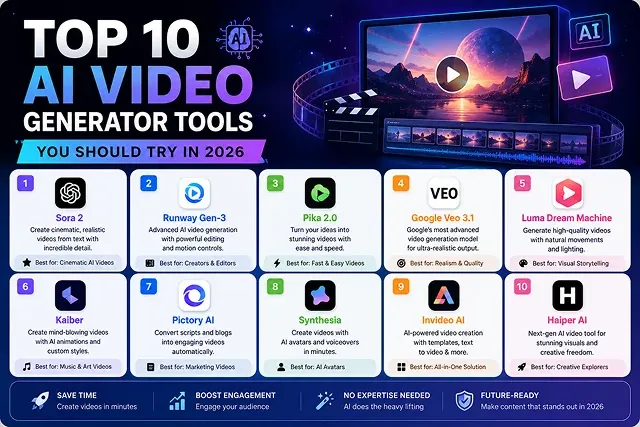
Technologies for generating videos have come a long way since the time when they used to create basic video effects. In 2026, advanced video technologies involve modern diffusion models, artificial sounds, and video production technology.
When creating faceless video channels, advertising campaigns, or web applications, it is important to have a proper video stack to make sure that your videos are rendered in a timely manner at low prices and attractive quality.
Here is the definitive guide to the Top 10 AI Video Generator Tools you should try in 2026, complete with production workflows and web optimization strategies.
Above-the-Fold Feature Matrix
AI Platform Comparison · Output Specs & Target Audience Benchmark
| AI Video Generator Tool | Standout Feature | Output Quality | Best Target Audience |
|---|---|---|---|
| Wan 2.2 Engine | Open-source MoE physics simulation | Up to 4K (via upscaler) | Filmmakers & Open Engineers |
| Hedra (hedra.me) | Flawless audio-driven lip-sync | 1080p HD | Avatar Creators & Animators |
| 3D Forge Engine | Text-to-3D asset blacksmithing | Engine-Ready OBJ/GLB | Game Developers & 3D Artists |
| Runway Gen-3 Alpha | Motion Brush & camera keyframing | 1080p HD | Commercial Video Directors |
| Google Veo 3 | Native multi-modal synchronized sound | Native 4K Master | Ad Agencies & Film Studios |
| OpenAI Sora 2 | 20-second continuous world modeling | 1080p HD | Concept Artists & Storyboarders |
| Kling AI | High-speed action & human kinetics | 1080p HD | Social Media Content Creators |
| Live Creator Avatar | Zero-latency interactive streaming | 1080p HD | Streamers & Broadcast Creators |
| Luma Dream Machine | Fluid camera vector dynamics | 1080p HD | Visual FX Artists & Animators |
| Haiper AI | Clean 2D cel-shaded line retention | 1080p HD | Illustrators & Anime Creators |
1. Deep Dive: Architectural Breakdown of the Top Platforms
1. Runway (Gen-4.5)
Runway remains the flagship suite for professional filmmakers and creative agencies requiring precise optical control.
- Key Innovation: Advanced Motion Brush and multi-camera spatial tracking vector controls. Instead of relying on text prompts alone, creators can manually draw motion direction vectors over specific background elements while locking the primary subject's perspective.
2. Google Veo 3.1
Google's flagship generative video architecture integrates directly into Gemini and Google Flow.
- Key Innovation: Integrated Multimodal Audio Synthesis. Rather than outputting silent video files, Veo 3.1 calculates spatial audio waves—such as footsteps on gravel, ocean spray, or vocal dialogue—concurrently during the video diffusion step.
3. Kling AI 3.0
Kling continues to lead the industry in handling complex human anatomy and high-speed motion.
- Key Innovation: Element Reference & Motion Lock. You can feed a single 2D character portrait or physical product render into Kling, and it will generate 10-second action sequences without altering facial geometry, clothing textures, or logo placement.
4. Wan 2.2 / 2.1 (Open Weights)
For developers, webmasters, and data-sensitive enterprises, Alibaba's Wan open-source model suite is the premier local processing engine.
- Key Innovation: The core innovations are the 3D Causal VAE Patching and, as model weights were made openly available, we can run Wan locally on one or a few Private GPU clusters (NVIDIA RTX 4090 or A100 systems) in ComfyUI providing infinite generation with zero subscription cost to an API service.
2. Production Workflow: From Text Prompt to Master Video
To construct high-quality video assets efficiently without wasting rendering credits, execute this systematic production pipeline:
1. Master Shot Keyframe Generation
- Create a high resolution single static keyframe image using an engine such as FLUX.1 or Midjourney. Ensure lighting, color grading and framing of character is finalized prior to transitioning into video.
2. Ingestion & Motion Vector Configuration
- Upload your master keyframe image into an Image-to-Video (I2V) pipeline (such as Kling 3.0 or Veo 3.1). Set camera movement parameters: specify explicit vector directives like "35mm lens, slow dolly-in along the negative Z-axis."
3. Single-Pass Neural Render Execution
- Run the generation pass at 24 FPS. Select a moderate motion scale parameter (0.3–0.5) to keep movement natural and avoid geometric distortion in background details.
4. Temporal Quality Control & 4K Upscale Pass
- Export the completed clip. Pass the video through a specialized temporal upscaler (such as Real-CUGAN for animations or Topaz Iris for live-action) to scale the footage up to a clean 4K Ultra HD (3840 x 2160) master file.
Top 10 AI Video Generators Master Comparison (2026 Edition)
Industry Leaderboard · Core Strengths & Native Audio Capabilities
| Rank | AI Video Generator | Core Strength & Focus | Native Audio Capabilities |
|---|---|---|---|
| 1 | Runway (Gen-4 / 4.5) | Industry-standard cinematic camera control and motion brush tools. | Sync/Layer Pass |
| 2 | Google Veo 3.1 | Extreme photorealism and integrated audio synthesis directly in-render. | Native Integrated Audio |
| 3 | Kling AI 3.0 | Hyper-realistic human anatomical motion and long-form physical tracking. | Synced Foley |
| 4 | Seedance 2.0 (ByteDance) | Ultra-fast multi-shot generation and high-volume commercial scene consistency. | External Sync |
| 5 | OpenAI Sora 2 | Deep physical world-model simulation and complex multi-prompt understanding. | Multi-Track Layer Pass |
| 6 | Wan 2.2 / 2.1 (Open Source) | Open-weights 3D Causal VAE architecture running locally on private GPUs. | Custom Local Pipeline |
| 7 | Luma Dream Machine | Smooth 3D camera spatial tracking and fast image-to-video transitions. | External Audio Pass |
| 8 | HaiLuo AI (MiniMax) | Expressive facial physics, subtle emotional micro-expressions, and high speed. | Synced Voiceovers |
| 9 | Hedra (Character-1) | Expressive audio-driven talking avatars and multi-model canvas workspaces. | Native Lip-Sync Audio |
| 10 | PixVerse V6 | Rapid multi-shot prompt testing and automated social-format rendering. | Integrated Audio Effects |
Request A Custom AI Video
Tell us what you're trying to create and we'll point you to the right tool — or help you set it up.
Under the Hood: Unified Multimodal Attention Architecture
Older generative video models operated on separate pipelines: an image diffusion network synthesized individual frames, a second temporal network guessed movement, and an external neural vocoder generated audio. Modern engines in 2026 like Google Veo 3.1, OpenAI Sora 2, and PixVerse V6 make use of Unified Diffusion Transform (DiTs).
The Technical Advantages of Unified Diffusion:
- Zero Frame Drift: The system computes spatial-temporal latent space in just one go allowing the system to eliminate things like melting of objects and anatomical flicker during quick-changing camera shots.
- Native Phase-Locked Audio: The spatial audio vector gets generated from video motion tokens achieving alignment of the physical sound up to a millisecond (like footsteps on concrete or mechanical humming).
- ZStep Distillation Acceleration: 2026 systems apply Latent Consistency Distillation (LCD) technology to reduce the number of required samples from fifty manual processes to four to eight rapid denoising processes enabling real-time 4K rendering.
Advanced Character & Asset Locking (Multi-Shot Consistency)
Maintaining character identity, clothing textures, and product shapes across multiple cuts is the hardest part of AI video creation. Execute this three-tier reference conditioning pipeline to ensure asset continuity:
Tier 1: [Frontal Master Shot] ──┐ Tier 2: [Side Profile Shot] ──┼─➔ [Multi-ControlNet Tensor Pass] ➔ [Locked Video Output] Tier 3: [Lighting Reference] ──┘
- Multi-View Reference Ingestion: The process of acquiring diverse viewpoints calls for three distinct source images: a frontal hero picture, a 45-degree profile picture, and a light texture map of the object being portrayed.
- Feature Extraction via IP-Adapter: To extract significant features, use either the IP-Adapter (an image prompt adapter) or the special reference-to-video node to separate key identity details from the backdrop lighting conditions.
- Low-Denoise Inpainting Pass: Finally, adjust the latent denoising factor as needed in order to maximize the effectiveness of the low-denoising inpainting pipeline: choose a value strictly within the range of 0.25 out of 0.35, since any value being equal to or above 0.40 can cause the model to create a totally different face.
Character & Visual Consistency Blueprint (IP-Adapter Pass)
Maintaining identical faces, brand logos, and clothing across multiple cuts is essential for narrative films and commercial ads. To lock visual identities across generations, use an Image Prompt Adapter (IP-Adapter) pipeline inside ComfyUI or your API server:
1. Generate & Extract Face Vector Embeddings
- Load 3 high-resolution reference images of your character (Front, 45-degree Profile, and Expression shot) into an IPAdapterApply node. Extract the latent face vector embedding using a clip vision encoder (CLIP-ViT-H).
2. Configure Cross-Attention Conditioning Weights
- Connect the extracted identity embedding directly to your Video DiT node. Set IP-Adapter Weight: 0.65 - 0.75 and Start/End At: 0.0 - 0.8. This forces the model to lock character features during the spatial layout phase while letting temporal layers animate movement freely.
3. Inject ControlNet Depth & Skeleton Vectors
- For complex actions (like running or dancing), overlay a ControlNet OpenPose or Depth Mask extracted from a driver video. Set ControlNet strength to 0.45 to prevent rigid motion stiffness.
4. Execute Tiled Diffusion Render Pass
- Run the generation pass using an open-source model (like Wan 2.2 or LTX Video). Export the master clip using an uncompressed ProRes or WebM container.
Top 10 AI Video Tools Matrix
Compare industry-leading generative platforms across physics simulation, camera controls, and speed metrics.
The absolute top 10 specialized video generators are: 1. Kling AI (unmatched character motion and clean daily free exports), 2. OpenAI Sora 2 (industry leader for spatial permanence and cinematic physics), 3. Google Veo 3 (native multimodal audio-visual generation with 60fps support), 4. Runway Gen-3 Alpha (professional director controls and Motion Brushes), 5. Luma Dream Machine (smooth camera panning and fast cloud renders), 6. Wan 2.2 (the premier open-source video model for local GPU setups), 7. InVideo AI (complete automated script-to-channel video assembly), 8. HeyGen (the gold standard for photorealistic speaking avatars), 9. CapCut AI Video (the fastest mobile/desktop editor for auto-captions and social shorts), and 10. Pika Labs (outstanding micro-animation and regional video editing tools).
For high-end spatial consistency and real-world mechanics, OpenAI Sora 2 and Google Veo 3 lead the industry. Both models accurately simulate complex real-world dynamics—such as fluid movement, cloth dynamics, volumetric smoke, and light reflection—without warping object edges or causing character shapes to dissolve during fast camera moves.
Wan 2.2 is the undisputed open-source benchmark. Developed with open weights, it allows creators to run high-definition video generation workflows directly inside ComfyUI or WebUI setups. Running Wan 2.2 locally bypasses web queues and credit fees, provided your desktop PC carries a graphics card with at least 12GB to 16GB of VRAM.
For hands-free content creation, InVideo AI and CapCut AI are exceptional options. InVideo AI can generate an entire long-form YouTube presentation—complete with voiceovers, matching B-roll footage, script writing, and dynamic captions—from a single text line. CapCut provides instant 9:16 re-framing and animated subtitle generation optimized for TikTok and YouTube Shorts.
Runway Gen-3 Alpha offers an outstanding suite of creator controls. Its native dashboard includes Motion Brushes (allowing you to paint specific movement areas onto static photos), camera trajectory grids, and advanced keyframing tools, giving video editors fine-grained control over complex camera movements.
Standard diffusion generators (like Sora or Kling) focus on sweeping camera motion and physical scenery. Avatar platforms like HeyGen specialize specifically in mapping audio tracks to facial geometry. They generate realistic lip synchronization, eye contact, and head movements directly from uploaded text scripts or voice files, making them ideal for corporate presentations, news anchors, and educational hosts.
Kling AI and Luma Dream Machine offer generous free trial credit pools that export clean, high-resolution videos without heavy corner logo stamps. Furthermore, running open-source models like Wan 2.2 via public Hugging Face Spaces or local ComfyUI setups provides completely unbranded video outputs for free.
Google Veo 3 features native, synchronized audio generation directly within its video rendering pipeline. Most other standalone video engines generate silent video files, requiring creators to pair their renders with specialized AI audio tools (like ElevenLabs for voiceovers or Soundful for background scores) during final timeline editing.
Image-to-Video is far superior for consistency across all 10 tools. Pure text prompts allow the diffusion model to randomize facial features and outfit details between renders. Passing a high-resolution base photograph into an engine like Kling, Luma, or Wan 2.2 locks down character identity, letting the AI focus entirely on adding smooth motion paths.
Adhere to this 3-Step Multi-Tool Pipeline: First, generate your static character concept art and background locations using Midjourney or FLUX to lock down your visual style. Second, import those base images into Kling AI or Runway Gen-3 to animate camera movements and physical character actions. Finally, generate custom voice tracks in ElevenLabs, compile your assets in CapCut, and run the master edit through an AI video upscaler to deliver a crisp 4K render.