
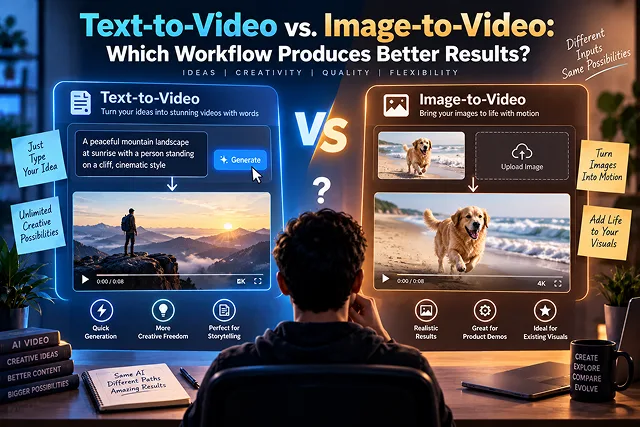
The argument between Text-to-Video and Image-to-Video displays a fundamental divide in generative media production between unrestricted creativity and stringent spatial and visual control.
Text-to-Video, in contrast, allows the generation of entire worlds, motion trajectories, and lighting conditions from just one written prompt, while Image-to-Video uses an approved high-resolution key frame to tie the spatio-temporal latent space. This, in turn, provides improved results in commercial pipelines, post film production, and marketing by separating aesthetic aspects of the images from motion dynamics.
Feature Comparison: Text-to-Video (T2V) vs. Image-to-Video (I2V)
Generative Pipeline Matrix · Text-to-Video (T2V) vs. Image-to-Video (I2V) Workflow
| Production Dimension | Text-to-Video (T2V) Workflow | Image-to-Video (I2V) Workflow |
|---|---|---|
| Primary Input | Text prompt (Subject, Action, Camera, Lighting) | High-resolution still frame + motion direction prompt |
| Character & Identity Consistency | Low to Moderate (Prone to facial/outfit drift across seeds) | High (Anchors directly to the source portrait or character frame) |
| Brand & Product Accuracy | Unreliable for exact logos, packaging, or UI | High (Preserves exact product silhouettes, labels, and colors) |
| Creative Exploration Speed | Fastest (Generates novel concepts from raw text) | Moderate (Requires prior image asset preparation/generation) |
| Camera & Motion Control | Text-dependent; subject often morphs during pans | Precise (Motion paths extrapolate from established spatial planes) |
| Compute / Iteration Waste | High (Requires numerous roll-the-dice re-renders) | Low (Fewer discarded renders because framing is locked) |
| Best Target Use Case | Rapid concepting, B-roll ideation, worldbuilding | Commercial ads, brand storytelling, talking avatars, product demos |
1. Why Image-to-Video Wins in Production Pipelines
Text-to-video foundation models (such as Sora, Wan 2.2, or early-stage diffusion systems) must solve two computationally difficult tasks simultaneously: spatial asset synthesis (what objects exist and how they are lit) and temporal motion synthesis (how pixels deform across the time axis).
[Text-to-Video Pipeline]
Text Prompt ───► [Massive Latent Probability Search] ───► Unpredictable Spatial Composition + Unstable Motion
                                                          (High hallucination and drift risk)

[Image-to-Video Pipeline]
Text Prompt ───► [Image Model: FLUX.1 / Midjourney] ───► Approved 2D Keyframe (Locked Geometry)
                                                                       │
                                                                       ▼
Motion Prompt ───► [Video Model: Kling / Runway / Wan] ───► Predictable, Spatially Stable Video Output
1. Separation of Concerns (Visual Design vs. Physics)
Attempting to describe an intricate product bottle, exact skin tone, 35mm shallow depth-of-field, lens flare, and a continuous lateral dolly tracking shot in a single text prompt overwhelms model attention heads.
By splitting the workflow:
- Stage A: A dedicated 2D generative model (FLUX.1, Midjourney, or Stable Diffusion with ControlNet) crafts the static composition, typography placement, and lighting palette.
- Stage B: The I2V engine only calculates velocity vectors, fluid movements, and secondary physics (hair physics, cloth dynamics, camera shake) based on that locked visual plane.
2. Multi-Shot Story Consistency
- When telling a story in commercials, an actor has to wear the same outfit and walk into a room during three shots (wide shot, medium over-the-shoulder shot, and close-up shot).
- In Text-to-Video, if the prompt “a man in a dark suit walks into a modern glass boardroom” is given three times, three different men will be generated wearing three different suits and totally different background architecture. With Image-to-Video, the director generates consistent keyframes using IP-Adapter or character LoRAs first, using I2V to bring those exact frames to life without identity drift.
3. Start-Frame and End-Frame Interpolation
- Advanced I2V platforms allow filmmakers to provide both an Initial Keyframe and an Ending Keyframe. The neural model calculates the mathematical morphing and optical flow required to connect Frame A to Frame B smoothly, giving creators precise control over scene start and termination points.
2. The Professional 5-Step Hybrid Video Workflow
To achieve commercial-grade output, professional studios deploy a hybrid Image-First Production Workflow:
1. Concept Scripting & Shot Listing
- Draft the dual-column audio/video script. Break down each scene into discrete 4- to 5-second shots, defining camera focal lengths, actor emotions, and dynamic scene actions.
2. Keyframe Synthesis & Style Anchor Vault
- Generate the master establishing shot and keyframes in a dedicated image engine (FLUX.1 or Midjourney). Create uniform lighting, grading and character seed tokens across all scene boards.
3. Spatial Inpainting and Cleaning Details
- Fix any anatomical issues (like extra fingers, strange logos or irregular pupils) in Photoshop or Krita before sending the frame to the video generator. Never feed an imperfect still into an I2V engine.
4. Motion Vector Conditioning & Video Synthesis
- Upload the cleaned keyframes into an I2V engine (Kling 3.0, Runway Gen-4, or Wan 2.2). Prompt strictly for motion verbs: "Slow forward dolly zoom, soft wind rustling hair, natural eye blink, steady camera tracking on the Z-axis."
5. Timeline Assembly, Sound Design, and Upscaling
- Join the clips in DaVinci Resolve or Premiere. Add foley sound, ambient sounds, and do some minor temporal upscale to take care of flickering and any noise.
Architectural & Operational Comparison Matrix
Workflow Dynamics Matrix · Text-to-Video (T2V) vs. Image-to-Video (I2V) Operational Comparison
| Production Dimension | Text-to-Video (T2V) | Image-to-Video (I2V) | Better Fit / Winner |
|---|---|---|---|
| Character Identity Stability | Low to Moderate. Characters often drift, mutate clothing, or alter facial geometry across cuts. | Ultra-High. Anchors directly to a seed image, LoRA portrait, or live-action photo. | Image-to-Video |
| Compositional Precision | Unpredictable. Camera framing and asset placement are left to latent model probabilities. | Deterministic. Exact framing, camera blocking, and prop placement set prior to motion. | Image-to-Video |
| Ideation & Brainstorming | Frictionless. Rapid concept generation from scratch without pre-made graphical assets. | Requires an upfront keyframe generation or photo-shoot stage. | Text-to-Video |
| Prompt Complexity & Prompt Adherence |
High burden. Prompt must define appearance, lighting, style, lens, and motion simultaneously. | Streamlined. The prompt only needs to govern directional velocity, physics, and camera trajectories. | Image-to-Video |
| Cost per Usable Second | High waste (40% — 60% reroll rate due to anatomical distortion or bad framing). | Low waste. Over 80% of rendered clips yield usable motion segments. | Image-to-Video |
| Camera Movement Dynamic Range |
Broad and wild. Can invent radical pans, surreal fly-throughs, and impossible angles. | Constrained by occluded image areas (out-painting hallucination boundaries). | Text-to-Video (Creative) |
Request A Custom AI Video
Tell us what you're trying to create and we'll point you to the right tool — or help you set it up.
3. How the Two Pipelines Process Latents Differently
The difference in output stability between T2V and I2V comes down to latent space conditioning:
[ Text-to-Video Pipeline ]
Text Prompt ──► [ CLIP / T5 Text Encoder ] ──► [ Random Noise Latent ] ──► [ 2D/3D DiT Steps ] ──► Video Clip
* Problem: The model must solve spatial layout AND temporal physics at the same time.

[ Image-to-Video Pipeline ]
Source Image ──► [ VAE Spatial Latent Encoder ] ──┐
                                                  ├──► [ Conditioned Latent ] ──► [ Temporal DiT Steps ] ──► Video Clip
Text Prompt  ──► [ CLIP / T5 Motion Weights ]   ──┘
* Advantage: Spatial layout is 100% resolved; the model only predicts motion vectors.
- In Text-to-Video, the model starts from pure Gaussian noise. When you enter the phrase "female doctor holding digital tablet in clean clinic," the Diffusion Transformer must produce the construction of her face, her clothes, the interior of the room, the design of the tablet, and the lighting from scratch. Every small seed variation or prompt modification redistributes the entire scene, causing character drift and visual inconsistency across sequential shots.
- In Image-to-Video, the Variational Autoencoder (VAE) converts an approved still image into a frozen latent starting frame. The model doesn't need to guess what the room looks like or how the doctor's hair is parted. It focuses solely on applying temporal attention layers to move the arms, animate breathing, or push the camera forward.
4. When to Use Text-to-Video (T2V)
Text-to-video works best if you need to go fast, want access to many creative options, and aren't concerned with controlling every pixel:
- Fast Moodboard & Idea Generation: Use it for film projects when you want to try out visual style or develop a fantasy/sci-fi world.
- Macro and Nature B-Roll with Mood: Water movements, cosmic nebulae, storm skies, or busy urban situations shot at different speeds with a priority on motion over details.
- Abstract Motion Graphics: Color swirls, sparkling dots, and experimental transitions that do not have to adhere to strict geometric forms.
5. When to Use Image-to-Video (I2V)
Using images to create videos is essential for many companies involved in production and storytelling:
- Consistent Character Storytelling: Using the exact same face, hair, and costume across 15 sequential scenes by feeding approved character reference stills.
- Product Demonstrations & Online Sales: Perfectly keeping the bottle shapes, dimensions of gadgets, labels, and surface textures in place throughout the generative process.
- Speaking Presenters & Digital Characters: Inputting high-resolution leaders' images into viseme technology to make video footage where they talk naturally.
- Intricate Light Creation and Framing Control: Sometimes, organizations need to have specific frame configuration (e.g., lighting at golden hour captured from Dutch angle), which is impossible using text commands.
6. The 5-Step "Hybrid Mastery" Production Pipeline
Creative professionals avoid confining their ingenuity to just a single approach but instead utilize Text to Image first and Image to Video second. Their hybrid technique offers maximum creative versatility with consistent quality:
1. Script and Lock the Visual Beats
- Write your dual-track script, identifying which scenes require absolute character/product continuity and which are atmospheric cutaways.
2. Establish Visual Anchors via Stills
- Generate your starting frame using dedicated text-to-image models or 3D asset viewports:
3. Animate via Image-to-Video Engines
- Upload your approved keyframe into specialized video diffusion engines:
4. Add Voice Cloning and Kinetic Typography
- Synthesize natural voiceovers via Instant Voice Cloning. Assemble clips in your timeline editor, add dynamic word-highlighted kinetic captions for muted mobile viewing, and level ambient audio at −16dB.
5. AI Spatial Upscale & Encode in 4K
- The assembled sequence can be processed with an AI upscaler that enhances edge clarity, eliminates the background noise, and encodes the sequence into either AV1 or HEVC (H.265) formats with Constant Rate Factor.
Text-to-Video vs. Image-to-Video
Compare visual control, character fidelity, camera predictability, compute efficiency, and workflow selection.
In Text-to-Video, the diffusion transformer synthesizes both the visual scene elements and temporal motion trajectories entirely from written prompt tokens. In Image-to-Video, the spatial geometry, color palette, lighting, and subject anatomy are established by a baseline source photograph, allowing the model's neural attention to focus almost exclusively on calculating realistic physics, optical camera paths, and temporal motion.
Image-to-Video consistently delivers superior visual quality. Dedicated image engines (like FLUX or Midjourney) generate finer textures, more authentic lighting, and sharper facial features than video models can generate from raw text. Passing an immaculate still image into an I2V engine carries that pristine visual resolution directly into the motion sequence without artifact degradation.
Professional studios prioritize Art Direction and Predictability. In commercial work, directors and clients must approve costume designs, architectural sets, lighting moods, and actor likenesses before rolling camera motion. I2V allows artists to lock down the exact visual frame using graphic design tools or image generators first, eliminating the unpredictable slot-machine randomness of pure text prompting.
Text-to-Video excels during Rapid Pre-Visualization, Unconstrained Worldbuilding, and Surreal Transformations. When brainstorming initial moodboards, testing dynamic camera velocities (e.g., FPV drone swoops through dense terrain), or generating abstract visual metaphors where strict anatomical fidelity is secondary, T2V generates broad creative ideas without needing pre-built still assets.
Pure T2V regularly suffers from character identity drift; describing the same character twice across separate prompts often results in different facial geometry and wardrobes. Image-to-Video solves character consistency by using a master character model sheet. You generate sequential storyboard stills featuring the exact same person, then feed each still into I2V to maintain identity integrity throughout the scene.
I2V platforms unlock precise director tools like Motion Brushes, trajectory grids, and Start-and-End Frame Keyframing. Because the engine recognizes existing pixel boundaries, you can paint a specific area (like water or flowing hair) to move while keeping the foreground stationary. In contrast, T2V relies on descriptive text hints, which the model often applies indiscriminately across the entire frame.
While cloud platforms often bill the same credit cost per 5-second video render for both modes, I2V has a substantially higher success rate per generation. Text-to-Video frequently requires 5 to 10 throwaway re-rolls to land an acceptable composition, whereas Image-to-Video typically succeeds in 1 to 2 attempts because the spatial foundation is already confirmed, saving 60% to 80% in wasted credits.
If an input image is overly flat or the motion slider is set too low, I2V models often freeze subjects, moving only the background camera. To force dynamic action, feed dynamic pose references with natural implied motion (e.g., mid-stride or leaning forward), raise your motion intensity setting to 5–7, and write explicit kinetic action directives in the accompanying text prompt box.
Text-to-Video cannot reliably render exact corporate packaging, proprietary hardware, or real logos. Image-to-Video is required for real product placement. You composite an authentic, clean PNG or packshot of your physical product into an AI-generated lifestyle scene via Photoshop or inpainting, then use I2V to animate atmospheric lighting and subtle camera dollies around the real product.
Adopt the Hybrid Production Framework: Use Text-to-Video during the exploratory stage to test raw ideas and pitch concepts quickly without overhead. When moving into production for client deliverables, commercial commercials, tutorials, or brand storytelling, switch 100% to Image-to-Video to guarantee visual continuity, sharp resolution, and reliable character fidelity.
Ready to try Skora AI?
Transform your ideas into cinematic video in seconds.