
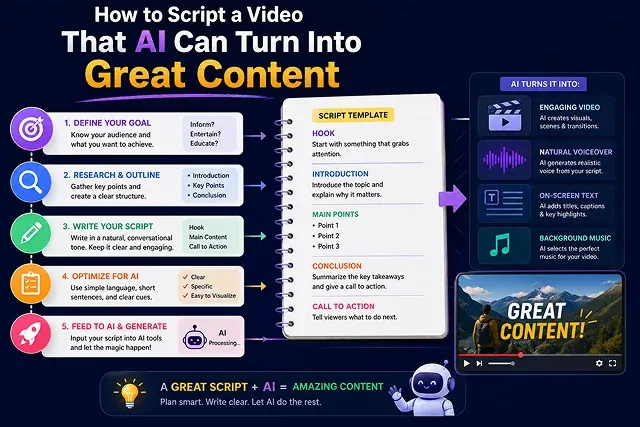
Crafting a script for an AI video creator isn't the same as crafting a movie or video script from YouTube. This is because cutting-edge Multimodal Diffusion Transformers, often abbreviated as DiTs (e.g. Kling 3.0, Google Veo 3.1, or Sora 2), translate text commands into frames, so your writing must intertwine entertaining narration for the audience and exact direction regarding camera angles.
Failing to specify visual components in the script will result in confused AI video systems creating unrealistic backgrounds and unrecognizable faces.
Above-the-Fold Feature Matrix: Traditional Scripting vs. AI Dual-Track Scripting
Scripting Framework Matrix · Human Crew Workflows vs. AI-Optimized Pipelines
| Scripting Dimension | Traditional Scriptwriting (Human Crew) | AI-Optimized Dual-Track Scriptwriting |
|---|---|---|
| Primary Output Goal | Guides human speech, acting, & emotional subtext | Directs visual prompts, audio visemes, & physics engines simultaneously |
| Visual Direction Format | Separate shot lists, storyboards, or director notes | Embedded 4-part prompt cues linked directly to dialogue blocks |
| Target Pacing Standard | 150–180 words per minute (Variable actor read) | Strict 120–140 words per minute (Prevents AI voice clipping) |
| Punctuation Function | Grammatical structure for silent reading | Acoustic timing cues (Commas = breath, periods = hard pauses) |
| Subject Consistency | Actors maintain physical features naturally | Requires explicit visual anchors per scene block |
1. Step-by-Step Scripting Pipeline
Follow this production workflow to draft, format, and prepare your script for AI video generation:
1. Draft the Core Narration & Audio Hook
- The first thing that should do is to write out a script. It must be simple and concise. The required length of the script must be about 120-150 words, that would correspond to a video of 60 seconds. The script must be so intriguing, that it will make the audience curious about the video from the first 3 seconds of watching.
2. Inject Visual Bracketed Prompt Cues
- Add direction and footage descriptions below every spoken sentence. Call out the camera angles and video style (e.g., shot with 35mm lens, low-angle moving video of a hacker coding at night).
3. Synthetic Voiceover Generation & Pacing
- Put your final script text into voice synthetic software (e.g., ElevenLabs). Adjust the stability of the sound to 45% to maintain the pitch variations, export the clean 24-bit WAV and edit out all unnecessary parts.
4. Feed Prompts into Video Engine
- Copy your bracketed visual prompts into your video generator (Kling 3.0 or Veo 3.1). Generate 3-to-5-second micro-clips matching each spoken sentence to maintain precise timeline alignment.
5. NLE Timeline Assembly & Audio Ducking
- Import your audio stem and generated video clips into an editor (such as CapCut Desktop or DaVinci Resolve). Apply kinetic captions centered on screen and set background music sidechain ducking to -18dB.
2. Guidelines on Scriptwriting for AI Videos
- Use Micro-Movements in Scriptwriting: AI video development tools have limitations when dealing with lengthy actions (for example, "someone moves through the house, takes a seat, powers on the laptop, and writes an email"). By breaking the more complex actions into mini actions, you will see an enormous improvement in the results you get.
- Maintain Style Anchors: Pre-pend a Global Style Anchor to every visual prompt in your script (e.g., "Cinematic 35mm anamorphic glass, natural film grain, slate grey and amber color palette"). This prevents your scenes from looking disconnected.
- Avoid Vague Pronouns: Be clear about what you want to say in your script. Instead of using "A person looks at the object," it is advisable to say "A middle-aged IT engineer examines a bright holographic screen."
The 4-Part AI Video Script Framework
An AI-optimized script divides every 60-second block into two synchronized tracks: Audio (Spoken Narration) and Visual (AI Prompt Instructions).
| Script Section | Duration & Timing | Audio Objective | Visual Prompt Instruction (DiT) |
|---|---|---|---|
| The Hook | 0 – 5 Seconds | Stop the scroll with an aggressive pattern interrupt or surprising statistic. | Cinematic extreme close-up, dramatic neon rim lighting, fast zoom-in. |
| The Problem | 5 – 25 Seconds | Validate the viewer's frustration and explain why traditional methods fail. | Medium tracking shot, moody office environment, cool color grade. |
| The Solution | 25 – 50 Seconds | Introduce the core concept, product, or workflow breakdown. | Clean isometric 3D render, smooth slow pan, warm golden light. |
| The CTA | 50 – 60 Seconds | Give a single, direct, friction-free call to action. | Clean macro shot of sleek mobile UI, static camera, high contrast. |
Request A Custom AI Video
Tell us what you're trying to create and we'll point you to the right tool — or help you set it up.
3. Advanced Prompting Rules for AI Video Models AI Video Models
Here’s the structural scripting to use for preventing visual drift and ensuring the AI generator gives cinematic clips:
- [Global Style Anchor] + [Shot Type / Lens] + [Subject] + [Action / Vector] + [Lighting & Color Grade]
- Use Correct Terminology: Do not say “the camera is moving,” use exact terms: “slow zoom in along X-axis,” “camera motion along the target’s path,” “camera with the focal lens of 24 mm,” etc.
- Describe Motion Patterns: High-speed movement can create smudge. Make means of motion minimal to merely one small movement in a series of scenes (e.g. say “the target turned left by 45 degrees” instead of “the target is standing up, walking across the room, and opening the door”).
- Utilize Seed Locks & Style Anchors: Insert a Global Style Anchor (e.g. “Cinematic 35mm film grain, 3200K warm key light, muted slate grey palette”) in the beginning of each scene description to ensure continuity of pictures.
4. Dual-Track AI Script Template & Execution
To write a script ready for AI generation, organize your document into a Dual-Track Audio/Visual Format:
+---------------------------------------+-----------------------------------------------+
| AUDIO TRACK (Voiceover / Audio)       | VISUAL PROMPT TRACK (DiT Camera & Asset Cue)  |
+---------------------------------------+-----------------------------------------------+
| [00:00 - 00:03]                       | [GLOBAL ANCHOR: 35mm anamorphic, 24fps, cinem |
| "90% of creators fail at AI video     | SHOT 1: Extreme close-up 85mm shot of a glowi |
| because of one simple mistake."       | digital eye reflecting matrix code, fast zoom-|
+---------------------------------------+-----------------------------------------------+
| [00:03 - 00:07]                       | SHOT 2: Medium tracking shot of a programmer  |
| "They write long essay paragraphs     | staring at a glowing laptop screen in a dark  |
| instead of technical scene cues."     | room, moody blue lighting, shallow focus.     |
+---------------------------------------+-----------------------------------------------+
5. Technical Mechanics: How Diffusion Transformers (DiTs) Parse Scripts
When you take in a visual text prompt (prompt a visual prompt to a video generating system like Kling 3.0, Veo 3.1, and Wan 2.7), your prompt is translated to the mathematical vector representations by two main neuronal subparts:
[Visual Text Prompt] ➔ [CLIP / T5 Text Encoder] ➔ [Spatial Attention (X, Y)] + [Temporal Attention (Time/Z)] ➔ [4K Master Video]
1. Spatial Attention (Frame Geometry)
- Function: It helps locate different items, colors, texture, and light on two-dimensional (X,Y) surface.
- Scripting Rule: Put your main subject first in the prompt. Diffusion models prioritize tokens placed at the beginning of a sentence.
2. Temporal Attention (Motion & Vectors)
- Function: Calculates how pixels shift across frame time steps (T dimension).
- Scripting Rule: Avoid compound verbs. Writing "A woman laughs, turns her head, and drinks coffee" overwhelms temporal attention, causing melting limbs or floating objects. Instead, isolate one action per scene: "A woman turns her head 45 degrees to the left, slow motion."
AI Video Scripting Primer
Master two-column storyboarding, phonetic voice optimization, camera directives, and AI prompt alignment.
Traditional scripts rely on human directors and actors to interpret subtext, emotion, and abstract metaphors. AI video scripts must be explicit and literal. Visual prompts must describe exact physical actions, camera angles, and lighting parameters per scene, while spoken audio lines require active-voice phrasing and deliberate punctuation to guide AI voice synthesis models cleanly.
The Two-Column format separates the video into two distinct layers: Column 1 (Spoken Narration / Dialogue) and Column 2 (Exact Visual B-Roll / AI Generation Prompt). Structuring your script this way ensures that every spoken sentence maps directly to a 3-to-5-second visual clip prompt, preventing scene gaps or misaligned B-roll during compilation.
Open your script immediately with a Curiosity Gap or High-Stakes Question. Avoid fluff like "Hello everyone, welcome back to my channel." Instead, start directly with lines like: "This single mistake is quietly destroying your video reach..." pair this spoken line with a high-contrast visual clip and animated text overlays in the first 1.5 seconds.
Write in short, conversational sentences using active voice. AI voice generators parse punctuation to determine cadence: use commas for brief breaths, em-dashes (—) for dramatic pauses, and ellipses (...) for trailing thoughts. Spell out complex numbers phonetically (e.g., "twenty-five hundred" instead of "$2,500") to prevent mispronunciation.
Diffusion models process physical shapes rather than conceptual ideas. Writing "show inflation taking a bite out of savings" leads the AI to literally generate money being bitten by teeth. Instead, translate abstract concepts into concrete physical descriptions: "A worried business owner counting paper banknotes on a wooden desk, close-up camera angle, warm indoor lighting."
Aim for a speaking rate of 130 to 150 words per minute. For a 60-second short-form video (TikTok/Shorts), limit your script to roughly 130–140 words. For a 5-minute explainer video, target 650–700 words divided into clear 30-second scene modules to maintain steady pacing and audience retention.
Include precise camera terms directly inside your visual prompt column. Use specific directives such as "slow tracking dolly-in," "low-angle pan," "macro close-up," or "FPV drone view." Specifying optics guides the AI video generator's motion vectors to simulate realistic physical camera movement across frames.
Use a structured system prompt: "Act as a viral AI video director. Write a 60-second script on [Topic] in a 2-column table. Column 1: Conversational voiceover narration using active voice and short sentences. Column 2: Specific AI image/video prompts describing literal physical subjects, lighting (e.g., golden hour), and camera moves (e.g., dolly shot) every 3 seconds."
Define a Master Character Descriptor Token Block at the top of your script sheet. Define distinct, immutable physical traits (e.g., "30-year-old female engineer, short curly red hair, navy blue denim jacket, silver round glasses"). Copy and paste this exact descriptor phrase into every visual prompt column entry across scenes to keep character features locked.
Follow this 3-Step Execution Pipeline: First, generate your full audio narration track in ElevenLabs to lock in scene timing. Second, copy visual prompts from Column 2 into your AI video engine (Kling, Luma, or Sora) using Image-to-Video baseline references. Third, bring audio and video clips into your timeline editor, add dynamic auto-captions, and export your master video.
Ready to try Skora AI?
Transform your ideas into cinematic video in seconds.