
An explainer video of a company is often considered the most valuable tool for a corporate website. Many people do not have the time and desire to read long instructions about the product of the company but 85% of people will consider buying the product after watching a video that is one minute to one and a half minutes long and explains what the company does and what significance it has in the world.
The task of producing the explainer videos in the past included professionals: creative agency, copywriters, voice-over actors, and animators, so the necessary amount of money to make such videos was from USD 5000 to 25000 and the time period was approximately four weeks. Now with the help of certain structured and narrative schemes and modern artificial intelligence technologies, people can create high-quality explainer videos within one day or even in a few hours.
Traditional Agency Production vs. AI Explainer Video Pipeline
Explainer Video Production Matrix · Traditional Creative Agency vs. Browser-Based AI Video Pipeline
| Production Dimension | Traditional Creative Agency | Browser-Based AI Video Pipeline |
|---|---|---|
| Turnaround Time | 4 to 8 weeks (Pre-production to final delivery) | 2 to 4 hours (Script to 4K export) |
| Production Cost | $5,000 – $25,000+ per finished video | $0 – $50/mo (Web SaaS & open models) |
| Voiceover & Talent | Booking human voice talent & studio hours | Zero-shot neural voice cloning with natural cadence |
| Presenter / Spokesperson | Casting calls, day rates, on-camera retakes | Photorealistic talking avatars with viseme sync |
| Visual Assets & Props | Manual 2D/3D motion graphics & stock footage | Text-to-video diffusion & text-to-3D quad meshes |
| Revisions & Localization | Expensive reshoots; $1,000s per new language | Instant prompt adjustments & 50+ language dubbing |
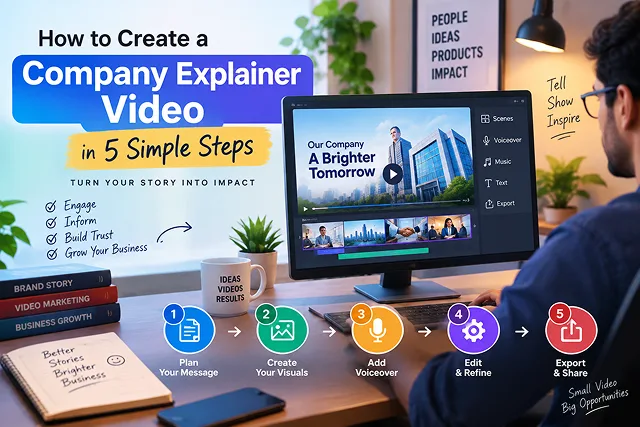
1. The 5-Step Company Explainer Video Framework
Explain videos work by demonstrating how the product creates benefits but do not tell viewers how it works as people will get lost in technical details.
1. Specify Problem-Solution Hook
- Create a short, 140-word two-column script that adheres to the four-time tested commercial structure: The Agitation (0:00-0:15) The Solution Reveal (0:15-0:35) How It Works (0:35-1:05) The Direct Call to Action (1:05-1:20) Be sure to address the bottleneck the customer is experiencing without relying on technical terminology.
2. Synthesize Voiceover with Natural Human Pacing
- Recording top-notch voiceover using neural voice synthesis technology from either Eleven Labs, Murf.ai, or Cartesia. SSML punctuation and pauses should help in making audio of the script clean.
3. Generate Brand-Consistent Visual Storyboards
- Create high res imagery or visual keyframes in FLUX.1 or Midjourney v6. Lock down your brand color palette + artstyle (such as clean 3D claymation minimalist 2D isometric or even photoreal techoffice) by establishing consistent aesthetic prompt anchors throughout all scene cuts.
4. Synthesize Dynamic Motion and Product Demonstrations
- Convert your static keyframes into smooth 4-second motion vectors using Image-to-Video diffusion models (Kling 3.0, Runway Gen-4, or Luma Dream Machine). For software products, pair these clips with high-resolution screen recordings highlighting the core user interface in action.
5. Assembly, Kinetic Subtitles, and Sound Design
- Put audio, video clips, and UI overlays in the editing software of your choice (DaVinci Resolve, Premiere Pro, Remotion). Add kinetic title texts, include sound effects to the transitions (i.e. risers, soft UI clicks, swooshes), and lower background music under narration by -18 dB.
2. The Four-Part Anatomical Structure of a 60-Second Video Explanation
Videos that are effective at attracting customers should not typically begin with the company's background. The viewers will typically either stay or leave within the first five seconds of watching so you should hold the audience's attention through a four-stage narrative:
┌────────────────────────────────────────────────────────┐
│               The 60-Second Explainer Arc              │
└───────────────────────────┬────────────────────────────┘
                            │
        ┌───────────────────┼───────────────────┐
        ▼                   ▼                   ▼
┌───────────────┐   ┌───────────────┐   ┌───────────────┐
│  1. The Hook  │   │2. The Solution│   │  3. The Core  │
│  (0:00–0:10)  │   │  (0:10–0:30)  │   │   Mechanism   │
│- Call out pain│   │ - Introduce   │   │  (0:30–0:50)  │
│- Target niche │   │   platform    │   │- 2 key features│
└───────────────┘   └───────┬───────┘   └───────────────┘
                            │
                            ▼
                    ┌───────────────┐
                    │ 4. The Action │
                    │  (0:50–1:00)  │
                    │ - Direct CTA  │
                    │ - Next step   │
                    └───────────────┘
- The Hook (0:00 – 0:10): Identify the specific friction and inefficiencies that your target market experiences on a daily basis.
- The Solution (0:10 – 0:30): Clearly explain to audiences what your company does and why you are providing an ideal alternative to the existing solutions.
- The Core Mechanism (0:30 – 0:50): Point out two or three clear functions or major benefits with the aid of visual tools and moving B-rolls.
- The Action (0:50 – 1:00): Present an explicit call to action (like “Start your 14-day trial” or “Book a demo”) and refrain from ending it in an inexact way.
Operational Comparison: The Modern Explainer Production Stack
AI Explainer Workflow & Production Matrix · Platforms, Deliverables & Core Advantages
| Production Stage | Top AI / Automation Platform | Output Deliverable | Key Advantage |
|---|---|---|---|
| Storyboarding & Script | Claude 3.7 / ChatGPT | Dual-column A/V production brief | Eliminates writer's block; calculates speaking rates. |
| Audio & Voiceover | ElevenLabs / Cartesia | 24-bit studio WAV dialogue stem | Natural inflection; programmatic SSML timing tags. |
| Visual Design | FLUX.1 / Midjourney | 16:9 master scene keyframes | Consistent aesthetic without hiring vector illustrators. |
| Motion Synthesis | Kling 3.0 / Runway Gen-4 | Fluid 4-second video cuts | Realistic camera pans, zooms, and object dynamics. |
| Programmatic Assembly | Remotion / DaVinci Resolve | Master 1080p / 4K MP4 export | Automatic dynamic subtitle burn-in and music sidechaining. |
Request A Custom AI Video
Tell us what you're trying to create and we'll point you to the right tool — or help you set it up.
3. How to Make a Company Explainer Video in Just 5 Easy Steps
A complete production plan to transform your business's main selling proposition into a professional-grade video asset is as follows:
1. Write the Dual-Track Explainer Script
- Your script should be created using a dual-track table separating spoken text from visual directions. The word count should be strictly from 120 to 135 which means you shall deliver audio at a proper conversational pace of 120-130 words a minute and avoid rushed delivery.
2. Synthesize High-Fidelity Voiceover
- Avoid robotic text-to-speech engines. Utilize Instant Voice Cloning to replicate the pure voice of an executive or spokesperson with the help of advanced technology. Break the voice to add slight pauses with the help of commas for 0.5 seconds and periods for 1-second breaks during the transitions between the thoughts.
3. Build Images with the Help of Specific Digital Engines
- Match each section of your script to browser-based generation tools:
4. Assemble Timeline & Add Kinetic Captions
- Import your rendered visual clips and cloned voiceover into an editor. Add dynamic kinetic captions with active word highlighting—over 80% of business videos on LinkedIn and mobile feeds are watched on mute. Mix ambient background music low (−16dB to −18dB) so the voiceover stays crisp and clear.
5. Make it available in 4K Quality and Use it Throughout the Campaigns
- Pass the video through an AI upscaling tool to clean artifact edges, adjust text quality, and get a good 3840 × 2160 (4K) version of the video. Embedding the video on the home page will assist it in being used in email signatures as well as cold calling sequences.
4. Acoustic Engineering and Hi-Fi Voice Generation
In order to prevent the robotic, monotonic effect associated with voice synthesis, make use of sound markers and special audio mastering chains.
Rules for Punctuation in Voice Engines
- Dash (—): Generate a 400 ms tonal sink, thereby producing suspense before revealing your answer.
- Ellipses (…): Give a downward inflection to the voice and add a 600ms dramatic pause.
- Technical Spelling for Phonemes: Spell out shortcuts or abbreviations so the neural engine doesn't have to guess what you said (e.g., E-T-L not ETL, and Sequel not SQL).
The Audio Mastering Chain
Process raw AI voice clips through this standard dynamic chain:
[ Raw Voice Clone Export ]
            │
            ▼
┌───────────────────────┐
│   High-Pass Filter    │ ───► Cut below 80 Hz (Removes low-end rumble)
└───────────┬───────────┘
            │
            ▼
┌───────────────────────┐
│     Parametric EQ     │ ───► Dip -2.5 dB at 400 Hz (Boxiness reduction)
│                       │ ───► Boost +2.0 dB at 3.5 kHz (Vocal clarity & presence)
└───────────┬───────────┘
            │
            ▼
┌───────────────────────┐
│   Optical Compressor  │ ───► 3:1 Ratio, 20ms Attack, 100ms Release
└───────────┬───────────┘
            │
            ▼
┌───────────────────────┐
│   Brickwall Limiter   │ ───► Target -14 LUFS integrated, -1.0 dB True Peak
└───────────────────────┘
5. Golden Rules for Company Explainer Videos
- Focus on the Core Outcome, Not Granular Settings: Avoid cluttering a 60-second video with technical sub-menus. Focus on the primary transformation your platform provides.
- Maintain Single-Action Prompting: Do not request that AI video engines produce several complex actions in a single 5 second video (e.g., "Person walks in, sits down, types on a laptop, and points to a chart"). Isolate one visual motion vector per clip and cut between them.
- Protect UI Safety Zones: When formatting versions for vertical platforms like YouTube Shorts or LinkedIn mobile, keep all essential text overlays, 3D props, and avatars centered away from bottom and right-side mobile buttons.
- Preserve Audio Separation: Background audio must always stay secondary. If background tracks cross above −12dB, they clash with synthetic voice frequencies, causing viewers to miss key details.
Company Explainer Video in 5 Steps
Master 5-step rapid production, narrative structure, avatar spokespersons, software mockups, and conversion tracking.
The 5-step blueprint includes: 1. Core Messaging & Scripting (defining the friction and value proposition), 2. Storyboarding & Visual Asset Creation (selecting avatars, 3D scenes, or UI mockups), 3. Voiceover & Audio Generation (synthesizing natural executive narration), 4. Video Generation & Timeline Assembly (rendering B-roll and stitching motion cuts), and 5. Polish & Delivery (adding kinetic captions, branded callouts, and call-to-action cards).
An efficient AI corporate stack features: Claude or ChatGPT (for 2-column audio/visual script creation), ElevenLabs (for crisp, broadcast-grade synthetic voiceovers), HeyGen or Synthesia (for generating custom company spokesperson avatars), Screen Studio (for silky smooth animated UI software captures), and CapCut or DaVinci Resolve (for final composite cuts, audio ducking, and kinetic typography).
The golden benchmark is 60 to 90 seconds (130 to 180 words total). Viewer retention drops sharply after the two-minute mark on marketing landing pages. Keeping the speaking cadence around 135 to 145 words per minute allows prospective clients to absorb your core solution, features, and pricing model comfortably without cognitive overload.
Follow the proven Hook-Friction-Solution-Proof-Action Framework:
• 0–10s: The Hook identifying your target customer's most painful operational problem.
• 10–30s: The Friction detailing why traditional tools fail or cost too much.
• 30–55s: Your Solution showing your product or service working smoothly.
• 55–75s: Social Proof highlighting client metrics, ratings, or trust badges.
• 75–90s: A single, frictionless Call to Action (e.g., "Start Your 14-Day Free Trial").
The highest-performing corporate explainer format is a Hybrid Composition. Open and close the video with a professional AI executive avatar speaking directly to camera to establish human warmth and leadership presence, but cut to crisp, animated screen recordings and graphic mockups for 70% of the runtime so prospects can see the actual product interface solving real tasks.
Never rely on generative AI to draw your brand logos or typography from scratch. Instead, build your visual assets in a design tool (like Figma or Illustrator) using your exact brand hex color codes, typography pairings, and vector SVG logo files. Import these brand assets as static overlays in your video editor over AI-generated background scenes or digital avatar footage.
In neural voice suites like ElevenLabs, choose voice profiles categorized under "Corporate Narration" or "Authoritative Conversational." Keep your stability setting between 45% and 55% to introduce natural vocal inflections and breath pauses. Use punctuation like commas, em-dashes (—), and periods to enforce thoughtful pauses before introducing key value metrics.
Using AI dubbing and neural lip-syncing platforms (such as HeyGen Video Translate or ElevenLabs Dubbing), enterprise marketing teams can translate their master English explainer into German, French, Spanish, Japanese, or Arabic in minutes. The presenter's mouth movements re-align to match the phonetics of each foreign language, allowing your sales team to deploy localized landing pages globally.
Avoid standard YouTube embeds on primary landing pages, as competing video recommendations and external branding pull prospects away. Instead, host your explainer on Wistia, Vimeo Enterprise, or Vidyard. Configure the player with muted autoplay, clean play controls, prominent burned-in captions, and a native interactive CTA button linking directly to your demo booking calendar.
Track three critical performance indicators: 1. Play Rate (the percentage of landing page visitors who click play; target 15–25%), 2. Average Engagement Rate / Drop-off Curve (aim for 70%+ of viewers reaching the 60-second mark), and 3. Post-Play Conversion Lift (the direct increase in trial signups or demo bookings from visitors who watched the video compared to those who did not).
Ready to try Skora AI?
Transform your ideas into cinematic video in seconds.