
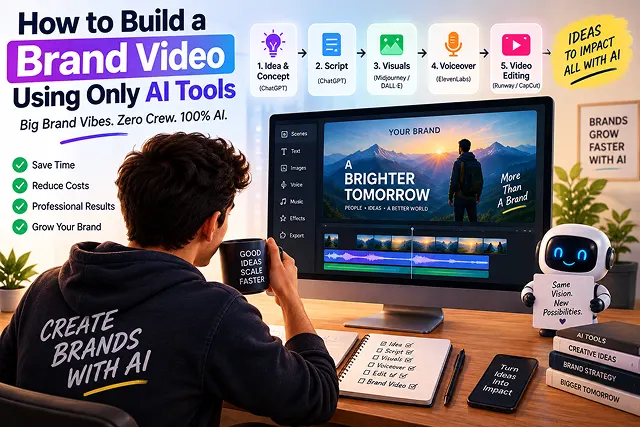
In the past, creating a commercial brand video that achieves maximum possible reach involved hiring a production company, bringing in actors, creating sound stages, and having budgets in excess of thousands of dollars.
However, in today's world it is possible for a single creative director or marketer to conceptualize, script, produce sounds, and unite the visual and audio content into a finished 60-second brand video that could be aired on TV in a day with the help of the newly-developed generative AI technologies.
The creation and actualization of a brand video that resembles an agency-level advertisement and at the same time not just a random video made up of AI-generated clips requires an organized and multi-faceted approach that would help avoid character drift, jitter, and odd sound effects often found in such videos.
Above-the-Fold Feature Matrix: Agency Production vs. 100% AI Brand Video Stack
Production Model Comparison · Traditional Creative Agency vs. 100% AI-Powered Brand Video Pipeline
| Production Metric | Traditional Creative Agency | 100% AI-Powered Brand Video Pipeline |
|---|---|---|
| Turnaround Speed | 4 to 8 Weeks (Pre-production, shoots, post) | 1 to 2 Hours (Script to final 4K render) |
| Production Cost | $10,000 – $50,000+ per finished minute | $0 – $50/mo (Web browser SaaS & open models) |
| Voiceover & Audio | Booking voice artists & sound engineers | Cloned neural voiceover + AI ambient Foley FX |
| Actor & Presenter Fees | Daily rates, casting calls, talent contracts | Custom photorealistic AI talking avatars |
| 3D Asset & Prop Pipeline | Weeks of CAD & 3D motion design work | Engine-ready text-to-3D quad meshes in minutes |
| Global Localization | $1,000s per language for foreign re-shoots | One-click multi-language dubbing & lip-syncing |
1. Preventing "Visual Drift": The Image-to-Video (I2V) Foundation
Visual Drift refers to the most usual problem in campaigns that are made by Artificial Intelligence. It happens when the major character’s face, attire, or color scheme alters unexpectedly during various cuts of the scenes in a video.
❌ The Flawed Text-to-Video (T2V) Route:
Prompt 1 ➔ [T2V Engine] ➔ Scene 1: Man in blue suit (Face A)
Prompt 2 ➔ [T2V Engine] ➔ Scene 2: Man in blue suit (Face B - completely different person)

✅ The Professional Image-to-Video (I2V) Route:
[Consistent Character Model via FLUX.1 + LoRA] ➔ Master Keyframe Image Sequence
                                                               │
                                                               ▼
[Video Diffusion Engine: Kling 3.0 / Gen-4] ◄── Fed via I2V (Prompts dictate camera motion only)
                                                               │
                                                               ▼
Consistent Character Geometry, Lighting, & Wardrobe Across All 12 Timeline Cuts
The 3 Rules for Brand Continuity:
- Never use raw Text-to-Video for hero actors: Always generate a static reference portrait first using an image generator trained on a consistent seed or character LoRA.
- Lock your Global Color Matrix: Prepend every image prompt with the exact color grading terms: "Cinematic 35mm photography, subtle cyan and tungsten balance, 800 ISO grain, directional rim lighting."
- Prompt strictly for camera movement in I2V: When feeding the static image to your video generator, do not re-describe the character's face. Prompt only for camera motion vectors: "Slow 35mm tracking shot moving slowly forward on the Z-axis, subtle hair movement in the wind, static studio background."
2. The 6-Step Brand Video Production Sequence
Follow this end-to-end operational pipeline to go from blank page to finished commercial master:
1. Draft the Dual-Column Audio/Visual Script
- Create a voiceover of the brand that lasts 60 seconds, which will include around 130-145 spoken words. Then arrange the voiceover in two columns. All the sounds of the voiceover should be put down in the left column while the visual image matching the voiceover should occupy the right column.
2. Generate Master Keyframes & Character Seeds
- Generate static 16:9 images for every scene in FLUX.1 or Midjourney. Lock your character seeds and ambient color palletes. You should create 12 to 15 frame images that represent the brand identity visually.
3. Synthesize Motion via Image-to-Video (I2V)
- Ingest each master keyframe into Kling 3.0, Runway Gen-4, or Google Veo. Motion intensity sliders should be set at between 0.3 and 0.45 so as to have a clear structure while making movements with the camera such as pans, tilts, and dolly movements.
4. Synthesize Voiceover & Master Audio Stems
- Utilize ElevenLabs to provide a voiceover by employing a voice profile which is assertive yet conversational. Make use of break tags () to ensure that the visuals come with sufficient spacing in between them.
5. Compose Cinematic Soundtrack & Layer Foley
- Generate an ambient, building orchestral or synth soundtrack via Suno or Udio at 120 BPM. Export isolated instrumental stems. Incorporate subtle sound effects, such as risers, subtle whooshes, and room sound textures, in order to create a more visually appealing experience.
6. Timeline Editing, Sidechain Ducking, & Finishing
- Based on your assets in your NLE (DaVinci Resolve or Premiere Pro) Trim the first and last.5 second of each AI video clip to remove startup warp. Duck the music track by −18dB under the voiceover. Apply a master film grain overlay (2% opacity) to unify visual textures across all models.
The Full-Stack AI Brand Video Production Suite
No single platform handles scriptwriting, visual generation, voice cloning, and audio mastering equally well. Leading brand videos rely on a best-of-breed modular toolchain:
| Production Phase | Industry-Standard Tool | Operational Function | Primary Deliverable |
|---|---|---|---|
| 1. Ideation & Scripting | Claude 3.7 / GPT-4o | Dual-column audio/visual storyboard scripting. | Structured 60-second script & prompt cues. |
| 2. Keyframe Generation | FLUX.1 (Pro) / Midjourney v6 | High-consistency visual asset creation. | 4K native 16:9 base keyframes. |
| 3. Video Synthesis | Kling 3.0 / Runway Gen-4 / Sora | Image-to-Video (I2V) motion vector generation. | 4–6 second B-roll and hero clips. |
| 4. Voice & Dubbing | ElevenLabs | Cloned executive voice with dynamic pacing. | 24-bit studio WAV narration stem. |
| 5. Soundtrack & SFX | Suno v4 / Udio / Epidemic AI | Cinematic instrumentation and foley effects. | Multi-track backing stems & foley sweeps. |
| 6. Assembly & Finishing | DaVinci Resolve / CapCut Desktop | Color matching, kinetic captions, & mastering. | 1080p/4K master delivery files. |
Request A Custom AI Video
Tell us what you're trying to create and we'll point you to the right tool — or help you set it up.
3. Character Identity Anchoring: Training a FLUX.1 LoRA
Using standard seed locking or generic image-to-image prompting always degrades over 8–12 scene cuts. The industry standard for commercial continuity is training a lightweight Low-Rank Adaptation (LoRA) on an open-weights image model (FLUX.1 [dev]).
[15-20 Clean Portrait Photos] ➔ [Automated Tagger (WD14 / CogVLM)] ➔ [Kohya_ss / AI-Toolkit]
                                                                               │
                                                                               ▼ (Rank 16 / Alpha 16)
[Master Character Checkpoint (.safetensors)] ➔ Injected into ComfyUI / Forge Pipeline
Dataset Curation & Training Parameters:
- Image dataset: 15 to 20 images of object pick a total of 6 tight headshots, 6 medium torso shots, and 5 full-body images with different lighting (dawn, tungsten, daylight) on a clean non-distracting background.
- Trigger Word Anchor: Assign a unique non-standard token, such as ohwx_brand_founder.
- Caption Format: Do not describe the face in the captions. We need to describe wardrobe, background, and lighting so that the LoRA can tie the facial geometry to the trigger token.
- "ohwx_brand_founder dressed in charcoal custom wool suit against an industrial house’s setting with directed softbox light from the left in a 35mm film shot."
4. DaVinci Resolve Fairlight: Sidechain Ducking & Mastering Acoustic Mastering
A major indicator of amateur AI content is an unbalanced audio mix where generated music masks the synthetic voiceover, or where the voice sounds dry and disconnected from the scene.
[Track 1: ElevenLabs Voiceover Stem (.WAV)] ────┬───► [Bus 1: Dialogue Master (-14 LUFS)]
                                                │
                                                ▼ (Sends Key Signal to Sidechain Compressor)
[Track 2: Suno/Udio Music Bed (.WAV)] ──────────┴───► [Compressor: Automatically Ducks -18dB]
Exact Compressor Node Parameters (Fairlight Track Dynamics):
- Insert the Voiceover WAV into Audio Track 1 (A1). Insert the Music Bed into Audio Track 2 (A2).
- In the Fairlight workspace, in Track A2 (Music), enable the Dynamics control panel.
- Click Sidechain (Listen) in the top right of the Dynamics window and select Track A1 as the key source.
Apply these operational compressor values:
- Threshold: -24 dB (Triggers attenuation the instant vocal speech registers).
- Ratio: 4.5:1 (Sufficiently suppresses the backing track without total silence).
- Attack: 18 ms (Allows the initial vocal consonant to punch through cleanly).
- Hold: 250 ms (Prevents the music from pumping up during brief micro-pauses between words).
- Release: 400 ms (Smoothly brings the music volume back up once a sentence concludes).
Master Output Normalization:
- Apply the Fairlight Limiter to the Master Bus targeting -1.0 dB True Peak}$ and an integrated loudness of -14.0 LUFS (0.5 LUFS), which conforms directly to YouTube, LinkedIn, and broadcast web standards.
AI Brand Video Production Suite
Master prompt-to-brand pipelines, visual identity locking, neural audio scoring, and cinematic delivery.
Yes. Modern generative suites cover the complete production lifecycle without traditional camera gear or studio sets. By chaining LLMs for brand manifesto scripting, FLUX or Midjourney for visual lookbooks, Kling, Sora, or Runway for cinematic motion, and ElevenLabs and Suno/Udio for voiceover and soundtrack scoring, companies can craft studio-grade brand anthems at a fraction of agency costs.
A battle-tested modular brand stack consists of: Claude 3.7 or ChatGPT (narrative scriptwriting and 2-column storyboarding), Midjourney v6 / FLUX.1 (hero concept art and consistent reference keyframes), Kling AI or Runway Gen-3 (Image-to-Video scene generation), ElevenLabs (voiceover narration), Suno or Udio (bespoke brand instrumental soundtrack), and CapCut or DaVinci Resolve for editing and color grading.
Disjointed visuals happen when you rely on raw Text-to-Video prompts with different stylistic tokens. To unify your video, establish a Brand Style Guide Token (e.g., specific color palette hex codes, lens types like 35mm anamorphic, and lighting style like diffused cinematic natural light). Use an Image-to-Video workflow where all scene images are generated under the exact same master prompt parameters before adding motion.
Create a character reference sheet first. Generate your hero character in multiple angles and lighting environments, then feed those images as IP-Adapter or character reference images into Midjourney or FLUX. In your video generator, use start-and-end frame features or Image-to-Video inputs to ensure facial features, clothing, and hair remain locked from the opening hook to the final scene.
Direct AI generation often distorts logos and brand typography. Instead, use a Composite Hybrid Method: take real photos of your product or high-res UI mockups, integrate them into background environments using image composition or inpainting tools, and animate subtle environmental motion around them. For final logo stings, animate vector SVGs directly inside your video editor.
Follow the Mission-Friction-Elevation-Promise Blueprint:
• 0–15s (The World): Establish the human reality or shared belief.
• 15–40s (The Friction): Highlight the modern challenge or emotional barrier.
• 40–70s (The Elevation): Introduce your brand's philosophy and empowering transformation.
• 70–90s (The Promise & Call to Action): Culminate in your brand tagline, mission statement, and logo reveal.
Using tools like Suno v4 or Udio, prompt for instrumental tracks using structural cues and mood descriptors: "[Instrumental], cinematic orchestral build, warm ambient synth pads, minimal piano intro, uplifting crescendo, 110 BPM, broadcast commercial quality." Generate multiple takes, select the one with natural emotional arcs, and apply audio ducking beneath your voiceover track.
Ensure all assets were generated under active paid enterprise or commercial SaaS plans (granting full commercial usage rights). Verify that voice clones have signed talent releases or use commercial stock voices, avoid artist-named prompts, and toggle platform synthetic media disclosures when launching paid ads on Meta, YouTube, or LinkedIn.
A traditional 60-second agency-produced brand commercial typically runs between $25,000 and $150,000+ across crew, talent, gear, and location costs with a 6-to-12-week timeline. An all-AI production runs on tool subscriptions and generation credits totaling $100 to $500, delivering a broadcast-ready 4K master in 48 to 72 hours.
Follow this proven 4-Stage Anthem Pipeline:
• 1. Script & Storyboard: Draft a 90-word manifesto script in Claude and create a 12-shot visual storyboard.
• 2. Visual Generation: Render consistent keyframe stills in Midjourney/FLUX, then animate them using Image-to-Video in Kling AI or Runway.
• 3. Audio Synthesis: Generate an authoritative voiceover in ElevenLabs and an original score in Suno.
• 4. Assembly & Master: Edit in CapCut/DaVinci, color grade to match brand guidelines, overlay vector logos, and upscale to 4K.
Ready to try Skora AI?
Transform your ideas into cinematic video in seconds.